Build a research playlist that saves you hours (a practical system with ClipNotebook)
December 20, 2025
Research moves fast. One good link becomes ten. Ten becomes fifty. You open “just one more tab,” and suddenly you’re running a small browser zoo: half‑read docs, three competing blog posts, a PDF you can’t find again, and a video queued “for later” that never arrives.
A research playlist is how you stop losing time to that chaos.
The idea is simple: instead of collecting links in a pile, you build a flow that you can follow again later, share with someone else, and maintain without rereading everything. ClipNotebook is a good fit for that job because it turns links into a clean list you can organize and revisit.
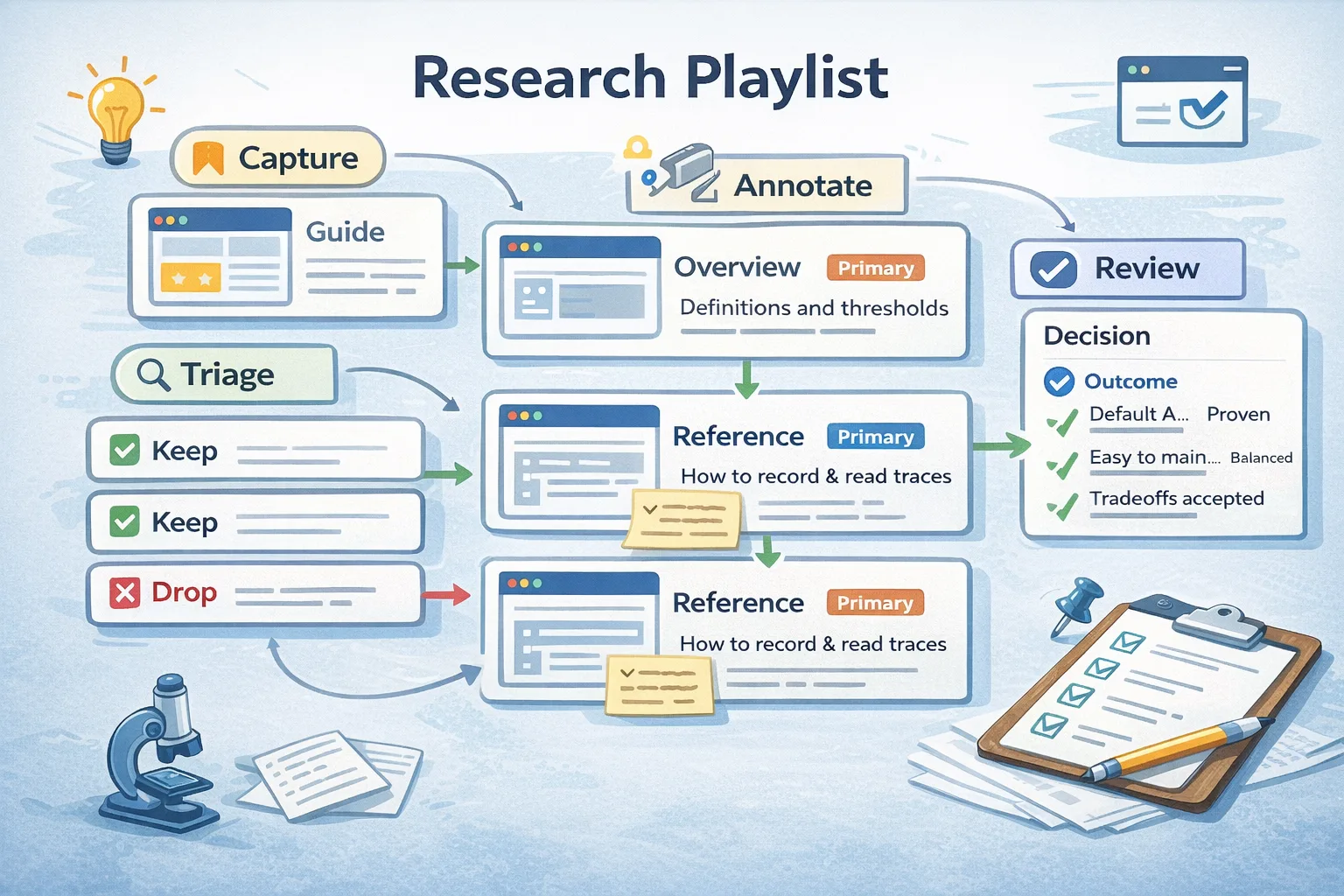
This is a practical system you can use today. No theory, no “second brain” jargon. Just a repeatable workflow: capture → triage → annotate → review → share.
What a research playlist is (and what it is not)
Most bookmark folders fail for one reason: they are a storage system, not a thinking system.
A research playlist is different. It is a curated set of links that answers a question and has an exit condition.
Examples of real playlist goals:
- “Ship a landing page that passes Core Web Vitals on mobile.”
- “Decide whether to move from Pages Router to App Router this quarter.”
- “Choose an auth approach for a small product without building a security nightmare.”
Non‑examples (these become junk drawers):
- “SEO stuff.”
- “JavaScript.”
- “Interesting design links.”
Rule of thumb
If your goal cannot fit in one sentence, your playlist needs a narrower scope.
Step 1: Write a goal and an exit condition
Start by writing two lines at the top of your playlist (even if only in your head):
- Goal: what you’re trying to accomplish.
- Exit condition: what “done” looks like.
Here are concrete exit conditions that work:
- “I can explain the topic in five bullets and link to three primary sources.”
- “I can implement the approach and verify it with a measurement (Lighthouse, WebPageTest, etc).”
- “I can make a decision and list the tradeoffs I accepted.”
This is the difference between collecting information and producing an outcome.
Step 2: Create a dedicated ClipNotebook playlist
Create a fresh notebook in ClipNotebook and treat it like a single project space. One notebook per topic keeps your research from bleeding into unrelated work.
If you know you will share it, pick a name that will make sense to someone else in a week:
- Good: “Core Web Vitals for a SaaS landing page”
- Good: “Enterprise network constraints: proxies, CSP, cookies”
- Bad: “reading”
Small habit that saves time
Put the date in the notebook title when the topic changes quickly (security, product launches, policy changes). It helps you tell what is current.
Step 3: Capture links fast (do not curate yet)
The capture phase should be low‑friction. Your job is to stop losing links, not to judge them immediately.
Capture sources across four buckets:
- Primary sources (standards, official docs)
- Deep explanations (high‑quality articles, talks)
- Examples (case studies, repos, incident write‑ups)
- Tools (checklists, calculators, test suites)
Two sources that are consistently worth capturing for web work:
Step 4: Use titles that carry context
Most playlists fail because titles are vague. You come back later and every link looks the same.
Good titles contain:
- the claim (what the link helps you do)
- the scope (what it is and is not about)
- the role (overview / deep dive / tool / example)
Examples of titles that stay useful:
- “Overview: Core Web Vitals and what counts as ‘good’ (web.dev)”
- “Tool: Lighthouse performance audits and how to interpret them”
- “Reference: Next.js build output and route sizes”
- “Example: Using
<details>for accessible disclosure UI (MDN)”
Avoid titles like “great article” or “watch later.” Those are future‑you traps.
Step 5: Add a one‑line takeaway for every link
If you only do one thing, do this.
When you capture a link, add a one‑line takeaway to the title (or as a short note if you keep notes separately). The takeaway forces you to articulate why it belongs.
Examples:
- “Core Web Vitals: field vs lab data and why both matter”
- “CORS preflight: which headers trigger it and how proxies break OPTIONS”
- “INP: what interaction latency feels like in real UI, not in demos”
Why this works
The takeaway turns a playlist from “links I saved” into “a sequence of decisions I made.”
Step 6: Triage with a simple rating (keep it honest)
After you have 10–30 links, run a triage pass. The goal is not perfection; it’s to stop the playlist from becoming a landfill.
Use a very small rating system:
- Keep (K): high quality, primary source, or extremely relevant.
- Maybe (M): looks relevant but needs a skim.
- Drop (D): off topic, duplicate, or low signal.
You can implement this with tiny prefixes in titles (K/M/D). It’s crude, but it works.
Important: do not let “Maybe” grow forever. A playlist full of “Maybe” links becomes a procrastination tool.
Step 7: Turn the playlist into a learning path
Now you build the actual flow.
Most topics benefit from this order:
- Orientation (2–4 links): vocabulary and constraints
- Mechanics (3–6 links): how the system behaves
- Failure modes (2–5 links): what breaks in production
- Implementation (2–5 links): how to apply it in your stack
- Verification (1–3 links): how to measure success
If you’re researching a decision (buy vs build, adopt vs migrate), swap in:
- “What we get”
- “What it costs”
- “What can go wrong”
- “How we would roll back”
Step 8: Do a weekly maintenance pass (10 minutes)
Playlists rot for boring reasons: duplicates, outdated links, and unread items.
Once a week (or after a sprint), do a short pass:
- Remove duplicates.
- Replace weak sources with primary ones.
- Move the best 3–5 links to the top.
- Rewrite titles so they still make sense.
This takes ten minutes and saves you hours later.
Step 9: Share a clean snapshot
When your playlist is useful, share it.
The difference between a messy share and a valuable share is context:
- Put a short “Why this playlist exists” paragraph at the top.
- Keep the first 5 links as the recommended starting path.
- Include at least one primary source.
If someone can follow your first five links and understand the topic, you have created something worth bookmarking.
A concrete example playlist (Core Web Vitals)
Here is a small, real set of links that make a strong starter playlist for performance work:
- Overview: Core Web Vitals (definitions and thresholds)
- Guide: Learn Performance (practical performance fundamentals)
- Reference: Chrome DevTools Performance (how to record and read traces)
- Reference: Lighthouse (lab checks and common audits)
- Reference: Google Search Central (how search systems interpret quality signals)
Notice what this list does: it mixes definitions, tooling, and how‑to guidance. That combination is what turns “performance” into a project you can execute.
Common mistakes (and the quick fixes)
Most “research systems” fail for predictable reasons. If you want your playlist to stay sharp, avoid these traps:
- Saving without reading: capture is fine, but if nothing ever gets triaged, the playlist becomes a guilt pile. Fix: schedule one 20‑minute skim session after you hit 15 links.
- All sources are equal: a thread and an official spec are not the same. Fix: keep at least one primary source near the top and label opinion pieces as opinion.
- No decision artifact: you read a lot, then still cannot answer “what should we do?” Fix: add a short “Decision” note at the top once you decide, including the tradeoff you accepted.
- Titles that age badly: “great read” becomes meaningless in a month. Fix: rewrite titles into “what this link is for” language.
- Over-scoping: a playlist that tries to cover five topics becomes a dumping ground. Fix: split it the moment you notice two different goals.
A good playlist has an ending
The fastest way to make research valuable is to let it produce a decision, a checklist, or an implementation plan. If the playlist cannot produce one of those, it’s too broad.
Final checklist (publish-quality research)
Use this checklist when you want your playlist to stay useful:
- The goal is one sentence and has an exit condition.
- Every link has a title that explains its role.
- Every link has a one‑line takeaway.
- At least one primary source anchors the topic.
- The first 5 links form a clear learning path.
- Weekly maintenance keeps it lean.
If you follow this system, your research stops being a pile of tabs and starts being an asset: a path you can reuse, teach, and share.