I benchmarked 5 coding agents on the same tasks: results, methodology, and what actually matters
December 21, 2025
Coding agents are having a moment. Everyone has a favorite, everyone has a horror story, and the discourse is stuck between two extremes: “it replaces engineers” and “it cannot do anything useful.”
I wanted something calmer and more actionable. So I set up a small benchmark where five coding agents see the same tasks, under the same constraints, with the same evaluation rules.
This rides the same wave as the current “agents” hype, but I tried to keep it honest: small tasks that resemble what you actually do on a Tuesday, measurements you can reproduce, and results that force tradeoffs instead of declaring a single winner.
The point of this post is not to sell you on a specific product. It is to give you a benchmark you can run on your own codebase, with a scoring rubric that makes it hard to accidentally cheat.
Benchmark goals (what I optimized for)
I did not optimize for “most impressive demo.” I optimized for “least surprising in production.”
- Small tasks that fit in one sitting.
- Clear pass/fail checks.
- Realistic constraints: existing codebase, existing style, and a time limit.
- Metrics that punish hallucinated confidence.
If your goal is “which agent can write a new app from scratch,” you need a different benchmark.
The four tasks (same prompt, same repo)
I picked four task types because they represent the bulk of day-to-day engineering work.
- Refactor
- Change structure without changing behavior.
- Example: extract a helper, remove duplication, keep tests green.
- Bug fix
- One failing test or reproducible bug.
- Agent must find root cause, fix it, and not break adjacent behavior.
- Write tests
- Add tests that catch a real bug class.
- Not just snapshot spam. Tests should be meaningful and stable.
- Explain code
- Read a module and explain how it works.
- Identify risks, assumptions, and where to safely change behavior.
These tasks map to real responsibilities: reliability, maintainability, and communication.
What I measured (the metrics)
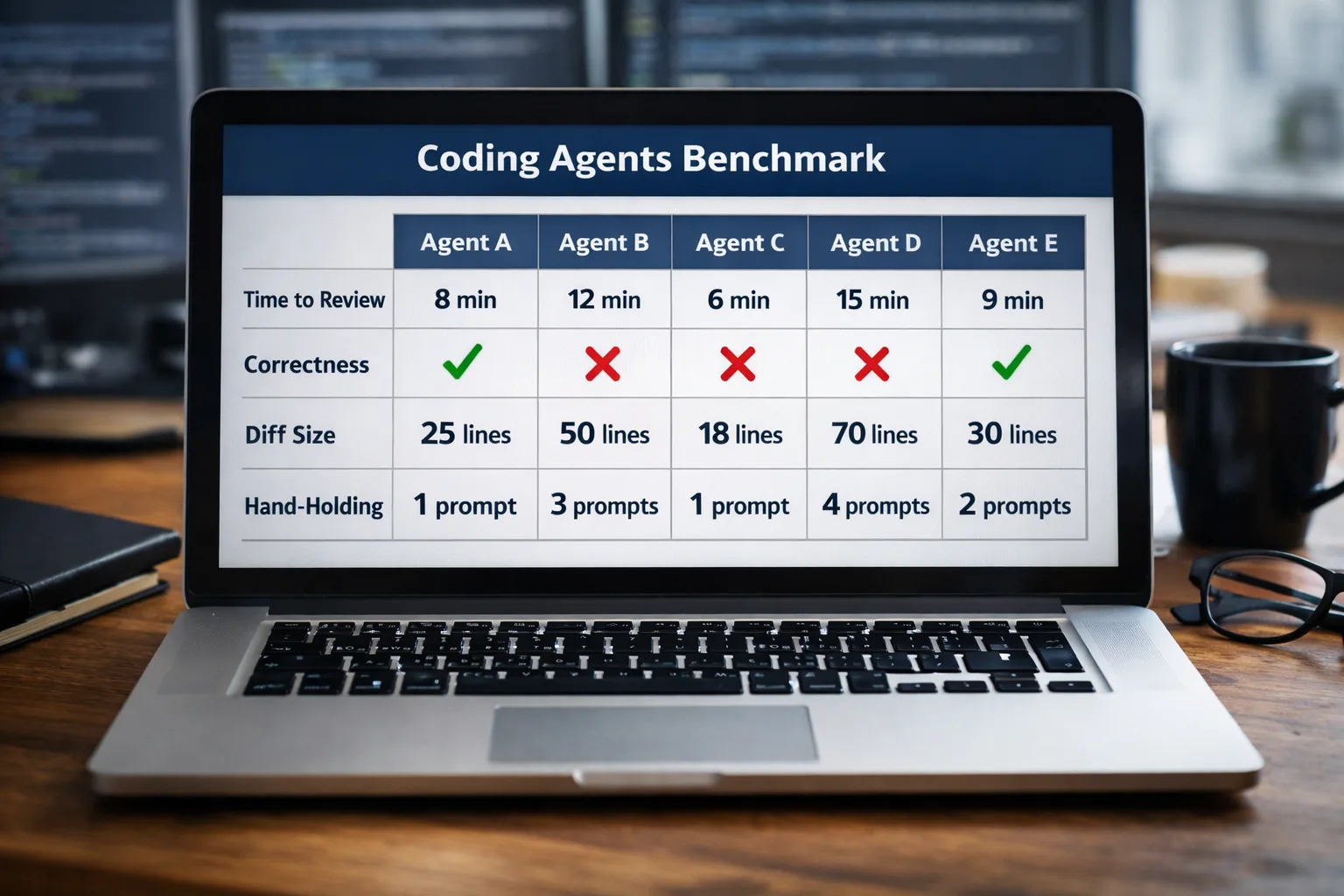
I tracked four primary metrics and two secondary ones.
Primary
- Time to “usable output”
- Measured in minutes.
- The clock stops when the PR is reviewable (or when the explanation is complete).
- Correctness
- Binary pass: does the fix actually address the task and keep the app working?
- For code tasks: tests pass and manual sanity checks match expected behavior.
- Diff size
- Lines added and removed.
- Bigger is not automatically worse, but big diffs are harder to review.
- Hand-holding rate
- How many times I had to clarify requirements or correct direction.
- This matters because an agent that “works” only after 12 nudges is expensive.
Secondary
- Confidence calibration
- Does the agent say “I am not sure” when it should?
- Does it propose verification steps or just assert success?
- Explanatory quality
- Can a teammate act on the explanation?
- Does it identify the real tradeoffs, or just paraphrase code?
For measuring diff size, I used Git stats (additions and deletions). If you want a standard reference, Git’s own documentation and tooling is the baseline: Git documentation.
Evaluation rules (so the benchmark is fair)
This is where most benchmarks cheat without realizing it.
- Same repo, same starting commit.
- Same task prompt text (copy/paste).
- Same time limit per task.
- Same “one retry” policy: each agent gets one additional clarification from me, then it must converge.
- Same definition of “done”: tests pass and the change is reviewable.
If you let one agent iterate for an hour and cut another off at 10 minutes, you are benchmarking your own patience.
How I recorded time and diff size (repeatable steps)
If you want smart readers to trust your results, you need to show exactly how you measured the numbers.
Time measurement rules
- Start the timer when you paste the task prompt.
- Stop the timer when you have either (a) a ready-to-review diff or (b) a complete explanation for the explain-code task.
- If the agent asks a question, the timer continues. That is part of real usage.
- If you run tests, the timer continues. The point is end-to-end usefulness.
Diff size measurement rules
- Compute diff stats against the starting commit.
- Record total additions and deletions.
- Record files changed.
Example commands (Git)
git status
git diff --stat
git diff --numstat
Reference: Git diff
If you use a platform that produces patch files or PRs, you can still derive the same metrics from the diff.
Correctness rubric (what counts as “right”)
Correctness is where benchmarks usually get squishy. I recommend publishing a rubric and sticking to it.
For refactor and bug fix tasks:
- Pass: tests pass, acceptance criteria met, and there is no extra behavior change.
- Partial: the intent is correct but it fails tests or needs a small human fix.
- Fail: wrong direction, breaks unrelated behavior, or cannot explain what changed.
For test-writing tasks:
- Pass: tests would have caught the bug class and are deterministic.
- Partial: tests exist but are shallow or flaky.
- Fail: tests do not run, do not assert anything useful, or are unrelated.
For explain-code tasks:
- Pass: explanation is accurate, identifies real edge cases, and names the safe change points.
- Partial: mostly accurate but misses a key risk.
- Fail: vague paraphrase or incorrect model of the system.
The tasks I actually used (small and realistic)
If you want to reproduce this benchmark, here is a clean set of “small but real” task definitions that work on almost any TypeScript web repo.
Refactor task example
- Replace repeated date formatting with a single helper.
- Acceptance: no behavioral change, snapshots still match, no hydration differences.
Bug fix task example
- Fix a serialization edge case where
undefinedbreaks static generation. - Acceptance: build succeeds; the page loads; no runtime warnings.
Write tests task example
- Add tests for a content parser: front matter parsing, missing fields, and sorting by date.
- Acceptance: tests fail on the broken version and pass on the fixed version.
Explain code task example
- Explain how markdown content flows from
.mdfiles into pages. - Identify where SEO metadata is generated.
This is the kind of work that quietly determines whether a project is stable.
How to publish results without turning it into marketing
If you publish a benchmark, the easiest way to lose trust is to present a leaderboard without the context needed to interpret it.
Instead of a “winner” table with unexplained numbers, publish two things:
- A scorecard (the measurement method).
- A run log (the environment and stop conditions).
The scorecard (what readers can verify)
Use a scorecard that has clear, auditable definitions. This one works well for small engineering tasks because it rewards correctness and reviewability.
| Metric | Definition | How to measure | What “good” looks like |
|---|---|---|---|
| Time-to-reviewable output | Minutes from prompt paste to a diff you would actually review | Start a timer at prompt paste; stop when tests pass and the diff is coherent | Finishes within your time box without frantic last-minute rewrites |
| Correctness | Does the change meet acceptance criteria without collateral damage? | Run tests; do a minimal manual check; inspect the diff for scope creep | Fixes the issue and does not introduce unrelated behavior changes |
| Diff size | How much code changed to reach the outcome | git diff --stat and git diff --numstat |
Small diffs when possible; large diffs only when justified |
| Hand-holding rate | How often a human had to redirect or clarify | Count clarifications you had to provide after the initial prompt | Asks clarifying questions early, not late; converges quickly |
| Confidence calibration | Does it admit uncertainty when it should? | Read the agent’s claims; check whether it suggests verification | Proposes checks and caveats instead of confident guessing |
| Explanation quality | Can a teammate act on the explanation? | Ask: could someone else review and verify based on this text? | Names tradeoffs, risks, and verification steps clearly |
The run log (what makes results comparable)
Under your benchmark write-up, include a compact run log:
- Environment: OS, Node version, package manager, browser version (if relevant).
- Repo profile: rough LOC, number of packages, test suite size.
- Agent configuration: model tier, tool access (repo-wide or file-limited), and whether it can install dependencies.
- Stop conditions: what counts as “done” and what ends the run.
- Retry policy: whether clarifications are allowed and how many.
This gives readers enough context to interpret differences without you arguing from authority.
What patterns usually show up
Even without naming specific products, the pattern is consistent across agents:
-
Speed vs correctness is real The fastest agent is often the one most willing to guess. That can look impressive until you ship it.
-
Diff size predicts review pain Large diffs are expensive, even if correct. If an agent can solve a bug with a 15-line change instead of a 200-line rewrite, that is a serious advantage.
-
Testing is the real separator Many agents can change code. Fewer can write tests that catch regressions and still look like something a human would maintain.
If you care about software quality, make “tests written” a first-class metric.
For testing references that readers trust:
Threats to validity (how benchmarks accidentally lie)
If you publish a benchmark, smart readers will ask how it could be biased. Answer that question directly.
- Familiarity bias
If you already know the repo well, you may unconsciously steer an agent toward the right area. Mitigation: write tasks that point to observable symptoms, not internal file names.
- Prompt drift
If you rephrase prompts mid-run, you are no longer comparing the same task. Mitigation: keep the prompt text identical and record it.
- Selective reruns
If you rerun only the agents you like, your final table is marketing. Mitigation: set a retry policy up front and apply it to all.
- Hidden assistance
If you fix a test failure yourself and still count it as an agent win, you inflated correctness. Mitigation: track correction cost in minutes.
- Task selection
If tasks are too synthetic, the benchmark measures “can autocomplete a toy.” Mitigation: include tasks that require reading and reasoning.
A small “judge checklist” you can reuse
If you want the post to be undeniably practical, end each task with a checklist:
- Does it pass
npm test(or equivalent)? - Does it pass
npm run buildfor Next.js apps? - Is the diff minimal and reviewable?
- Did the agent explain what changed and how to verify?
- Would you merge it without embarrassment?
How to make the benchmark harder (without making it unfair)
Once you run the baseline, you can add constraints that reflect real life.
- No network access.
- No dependency changes.
- Must explain the change in a PR message.
- Must add a test that fails before the fix.
These constraints reward agents that can reason rather than just generate.
The least-bad way to choose an agent
If you are buying or adopting a coding agent, do not ask “which is best.” Ask:
- Which one produces the smallest correct diff?
- Which one asks good clarifying questions early?
- Which one writes tests you would accept in review?
- Which one explains failures without spinning a story?
Pick the agent that fits your workflow, not the one that wins a single leaderboard.
Final take
A useful benchmark is not a marketing screenshot. It is a repeatable experiment with clear definitions.
Run small tasks. Measure time, correctness, diff size, and how much babysitting the agent needs. Publish your method. Publish your raw results. Let readers disagree.
That is how you earn trust and how you rank, because serious readers link to serious posts.